What is phishing?
Why you need to protect yourself
With the help of phishing, criminals try to obtain personal data such as credit card numbers or access data for online banking. To do this, they use emails or letters that imitate the appearance of companies such as us. We at EOS will never ask you for passwords, online PINs or similar. To check a debt or make an online payment, please always use the secure payment function in our payment portal.
Your security is our priority: Safe communication and data protection
At EOS, we use certified, industry-leading security standards (ISO 27001) to protect your data from unauthorized access. This means every payment you make and every detail you share with us is handled with the highest level of confidentiality.
How can I report a scam?
Have you received a suspicious e-mail or mail from EOS?
These days, it’s often hard to tell whether a message is genuine or a scam. If you see an error message after logging into our payment portal, or if you suspect a phishing attempt for any other reason, please contact our customer service.
We kindly ask that you contact us only if you have reasonable grounds to suspect that it is a scam or a mistake. If it is subsequently determined that the received communication is legitimate, any delay in responding may result in additional costs. We therefore recommend that you thoroughly verify all facts before contacting our company.
If the letter is genuine but you suspect identity theft or identity mix-up, please fill out form linked below to verify this and send it to us for processing.
How to recognize a phishing attempt
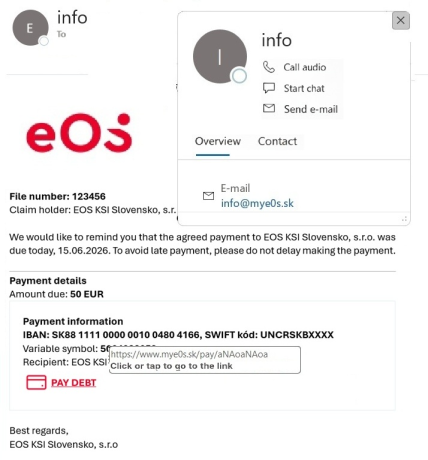
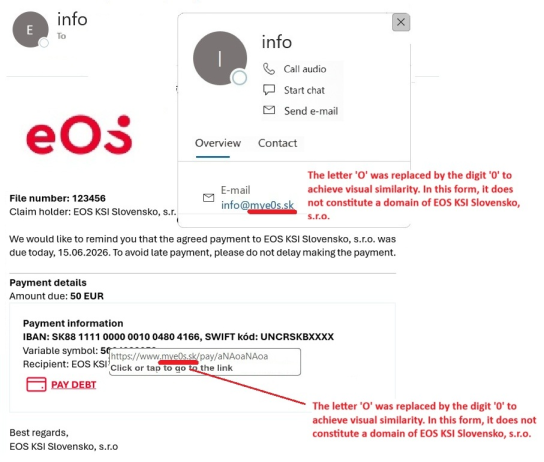
Emails and messages from fraudsters can appear highly convincing, as shown in the image. For your safety, it is essential to know how to recognize them in time. Neither a company logo nor a company name in the signature or sender name guarantees the authenticity of a message. Pay attention to the following key warning signs:
1. Check sender's address:
- Verify the actual sender's email address by hovering your cursor over the sender's name on a computer, or by long-pressing on the sender's name (or viewing message details) on a mobile device.
- EOS KSI Slovakia uses EXCLUSIVELY the domain myeos.sk for public communication. Any deviation (e.g., swapping 'O' for '0', adding hyphens like my_eos.sk, or additional modifications like myeos_company.sk) indicates that it is highly probable not an official communication from EOS KSI Slovakia.
- If the message fails this initial check, no further verification is needed; it is highly probable to be a scam.
2. Verify links in buttons/text:
- On a computer, hover your cursor over a button or text link (without clicking); the target URL will appear at the bottom of the screen. On mobile, a long press on the link will bring up a dialogue with the target URL.
- IMPORTANT: Always check the domain listed in the link. Even if the sender's address appears correct, the link might lead to a fraudulent site (known as spoofing).